Tema
Kreiraj System Restore Point iz komandne linije / skripte.
Postupak – tl;dr
PS C:\> Invoke-CimMethod -Namespace root/DEFAULT -ClassName SystemRestore -MethodName CreateRestorePoint -Arguments @{>> Description = (Get-Date).ToString()>> RestorePointType = [uint32]0>> EventType = [uint32]100>> } |
ReturnValue PSComputerName----------- -------------- 0 |
Ako se pojavi pogreška:
Invoke-CimMethod : The service cannot be started, either because it is disabled or because it has no enabled devices associated with it.At line:1 char:1+ Invoke-CimMethod -Namespace root/DEFAULT -ClassName SystemRestore -M ...+ ~~~~~~~~~~~~~~~~~~~~~~~~~~~~~~~~~~~~~~~~~~~~~~~~~~~~~~~~~~~~~~~~~~~~~+ CategoryInfo : ResourceUnavailable: (root/DEFAULT:SystemRestore:String) [Invoke-CimMethod], CimException+ FullyQualifiedErrorId : HRESULT 0x80070422,Microsoft.Management.Infrastructure.CimCmdlets.InvokeCimMethodCommand |
Rješenje
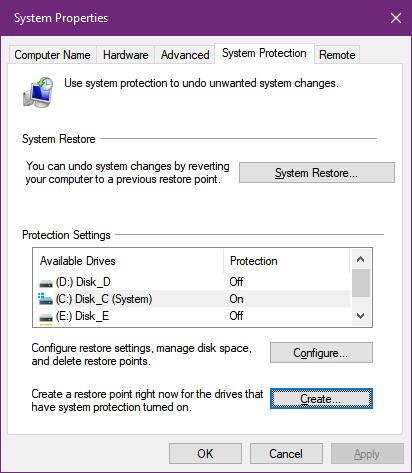
Vjerojatno je Start → System Restore → Protection Settings isključen za sve diskove. Ta uključimo ga za barem jedan od diskova , “System”, (Sl.1) i ponovimo naredbu.
Slike
Video
…
…

